Outlook Web App (OWA) does not provide support for digital certificates because it does not include support for S/MIME. If you received an email message that included digital signature, you may see "The message has a digital signature, but it was not validated" error.
To resolve this problem, you can follow these steps:
1. Click Start, click Run, type Regedit, and then click OK.
2. Locate and then click the following registry subkey:
HKEY_LOCAL_MACHINE\SYSTEM\CurrentControlSet\Services\MSExchangeWEB\OWA
3. On the Edit menu, point to New, and then click DWORD Value.
4. Type CheckEmbeddedSmime, and then press ENTER.
5. Right-click CheckEmbeddedSmime, and then click Modify.
6. In the Edit DWORD Value dialog box, under Base, click Decimal.
7. In the Value data box, type 1, and then click OK.
8. Exit Registry Editor.
"This operation has been cancelled due to restrictions in effect" When Click Link in Outlook Solution #2
The following is another alternative solution when you're receiving error of "This operation has been cancelled due to restriction in effect on this computer" upon clicking hyperlink in your Outlook.
- Close your Outlook and any opened browsers in your desktop
- Go to elevated Command Prompt (right click "Run as Administrator")
- Type in the following Registry Keys in your Command Prompt
REG ADD HKEY_CURRENT_USER\Software\Classes\.htm /ve /d htmlfile /f

REG ADD HKEY_CURRENT_USER\Software\Classes\.html /ve /d htmlfile /f

REG ADD HKEY_CURRENT_USER\Software\Classes\.shtml /ve /d htmlfile /f

REG ADD HKEY_CURRENT_USER\Software\Classes\.xht /ve /d htmlfile /f

REG ADD HKEY_CURRENT_USER\Software\Classes\.xhtml /ve /d htmlfile /f

Microsoft Surface Pricing Available Today
Pricing and pre-order of the new Microsoft Surface tablet will be available today. The new Microsoft Surface will be priced in line with Apple's iPad starting at $499. It comes with 32 GB of storage with expansion slot and it's running Windows RT. Surface is pre-loaded Microsoft Office 2013. Microsoft Surface is also available bundled with Touch Cover accessory for $599 with 32 GB of storage or for $699 for 64 GB version. A version with full running Windows 8 Professional will be available early next year.


McAffee Launched New Data Center Security Suites
McAffee announced four new data center security suites to help secure servers and databases in the data center. The suites offer a unique combination of
whitelisting, blacklisting and virtualization technologies for
protecting servers and virtual desktops. These solutions provide optimal
security for servers and databases in physical, virtualized and
cloud-based data centers, with minimal impact on server resources which
is a key demand for data centers.
The suites offer customers the ability to protect their physical and
virtual servers and virtual desktops with a unique combination of
technologies in a single solution.
- McAfee Data Center Security Suite for Server provides a
complete set of blacklisting, whitelisting, and optimized
virtualization support capabilities for basic security on servers of
all types - McAfee Data Center Security Suite for Server–Hypervisor Edition
provides a complete set of blacklisting, whitelisting, and optimized
virtualization support capabilities for basic security on servers of
all types and is licensed per Hypervisor - McAfee Data Center Security Suite for Virtual Desktop
Infrastructure provides comprehensive security for virtual desktop
deployments without compromising performance or the user experience - McAfee Database Server Protection provides data base activity
monitoring and vulnerability assessment in a single suite, for all
major database servers in the data center
Microsoft Sets Windows 8 Upgrade Pricing
Microsoft sets the price for an upgrade to the full version of Windows 8 operating system at $70 for a DVD pack. End users can also have the option to download Windows 8 in digital format on launching date, October 26th, for $40. This offer will expire at the end of January 2013. Computers running Windows XP, Vista and Windows 7 will be able to upgrade to Windows 8. Microsoft has yet to announce the price for full version of Windows 8.
Windows 8 Find Applications Shortcut
To find all your applications in Windows 8, you either,
1. Right click anywhere Start Screen and select All Apps
or
2. Press Windows key and Q at the same time

1. Right click anywhere Start Screen and select All Apps
or
2. Press Windows key and Q at the same time

Windows 8 Start Menu Short Cut
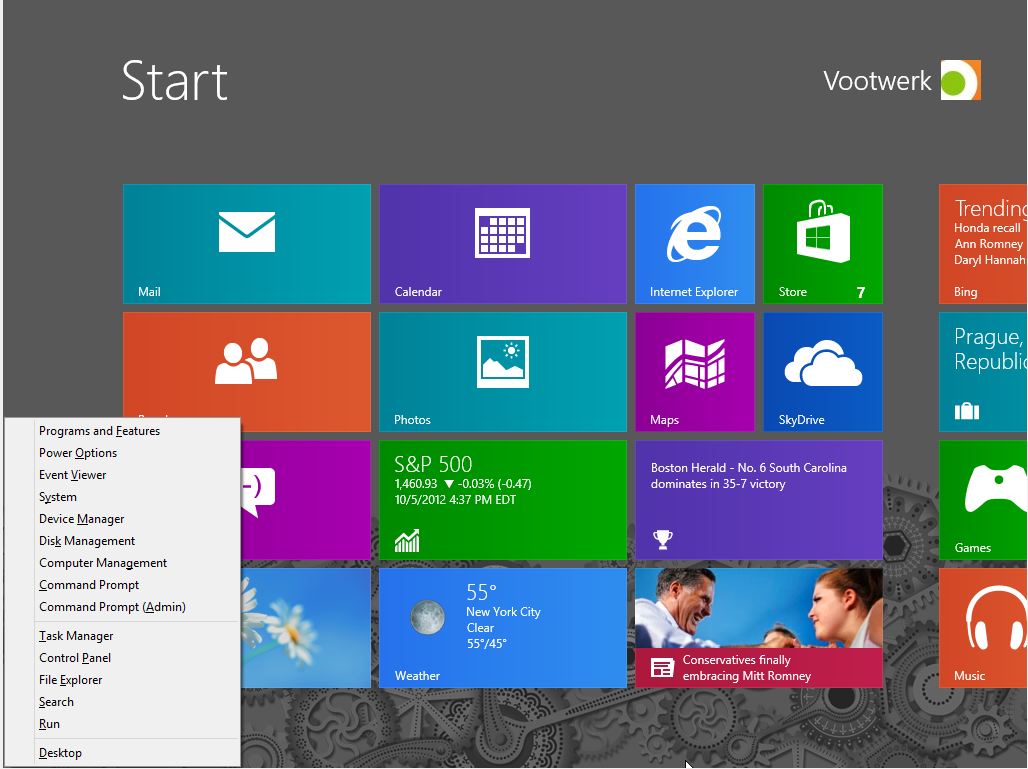
Basic Start Menu in Windows 8 can be accessed by hovering your mouse to the bottom left corner of your screen in Desktop menu and then right click. It can also be accessed by swiping form the rights side of a touch screen.
The shortcut for basic Start Menu is by pressing your Windows key and X key at the same time.

The shortcut for basic Start Menu is by pressing your Windows key and X key at the same time.